
Showing posts with label #techmesomething. Show all posts

Thursday, September 12, 2024

XBOX controller and Connection issues


Have you experienced some annoying issues with your Xbox controller where it wouldn’t connect to your devices or you have had issues with it disconnecting via bluetooth or even usb?


Welp, today was that day for me. My controller would no longer connect to my gaming laptop. To preface this, I had to reimage my computer due to some issues with a windows update that buggered the drivers. I reinstalled Windows 11, added my apps back to the PC games and all. When I went to actually connect my Xbox controller, It would not connect. It would show up in the list then also say it can’t connect.


I think I tried just about everything to get it to work. I tried adding via usb but the controller wasn’t recognized. I looked online to find that the other suggestion was to reimage using windows media creation to update windows. I then restored to updating or downloading the drivers directly to the computer that was suggested online. That also didn’t work. I checked and made sure I could actually connect another bluetooth device to windows like my phone, which connected just fine ,no issues. I disconnected wifi and also entered safe mode to verify I could actually add or update drivers in safe mode. Still the controller would not work. I tried connecting the controller to my mobile phone and nada.


You know what the final thing I did that actually then enabled it to work? (Maybe this was a coincidence but seemingly worked) I found an old generic controller I bought online for $10 and connected it. NO problem! It works with the games, nothing else needed right. Now while I had the other controller connected I then connected the Xbox controller. What the heck is happening??? It now works and connects. You would think the $60 controller would not have so many issues connecting but alas, the cheaper built controller has the win on this one.






Monday, September 6, 2021

TryHackMe Walkthrough: Linux Fundamentals Part 1


Room: https://tryhackme.com/room/linuxfundamentalspart1


Task 1: 

Introduction


Answer:No answer needed


Task 2: 

Research: What year was the first release of a Linux operating system?


Answer:1991


Task 3: 

I've deployed my first Linux machine!


Answer: Start Machine. No answer needed


Task 4: 

If we wanted to output the text "TryHackMe", what would our command be?


Answer:echo TryHackMe


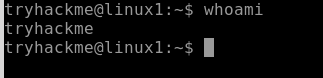
What is the username of who you're logged in as on your deployed Linux machine?


Answer:tryhackme

Task 5: 

On the Linux machine that you deploy, how many folders are there?

Answer:4

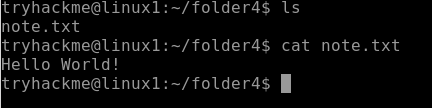
Which directory contains a file? 

Answer:folder4

What is the contents of this file?

Answer:Hello World

Use the cd command to navigate to this file and find out the new current working directory. What is the path?

Answer:/home/tryhackme/folder4

Task 6: 

Use grep on "access.log" to find the flag that has a prefix of "THM". What is the flag?

Answer:THM{XXXXX}


And I still haven't found what I'm looking for!


Answer:No answer needed


Task 7:

If we wanted to run a command in the background, what operator would we want to use?


Answer:&


If I wanted to replace the contents of a file named "passwords" with the word "password123", what would my command be?


  Answer:echo password123 > passwords


Now if I wanted to add "tryhackme" to this file named "passwords" but also keep "passwords123", what would my command be


Answer:echo tryhackme >> passwords 


Now use the deployed Linux machine to put these into practice


Answer:No answer needed


Task 8:

I'll have a play around!


Answer:No answer needed


Task 9:

Terminate the machine deployed in this room from task 3. 


Answer:No answer needed


Join Linux Fundamentals Part 2!


Answer:No answer needed

Thursday, October 15, 2020

A3C Conference 2020

 I stumbled upon the A3C conference on instagram. 

It is a conference that features various artist, producers, executives, and managers in the industry. 

If you are an independent artist, industry artist or just wanting more information, this conference is for you. Oct 15-16, 2020 @ 11:00 am

You can pick up a free ticket below: 

https://www.universe.com/events/a3c2020-for-the-culture-virtual-experience-tickets-C09SX6?ref=uniiverse-transactional_emailer-ticket_reply

Monday, July 6, 2020

SSCP - Tips on Studying For your Cert

The SSCP or System Security Certified Practitioner certification is similar to but a little more difficult than an entry level certification. If you are looking to get into cyber security, specifically administration and feel you would like a base of information the SSCP is, that would be in my opinion, worth obtaining. 

SSCP is geared towards Security Administration for various career paths. There are a couple of items you need to know to assist in studying for the Certification. 

First things first, you should know the requirements for the exam:

  • Have 1 year experience
  • Register for the exam
  • Pass the exam
  • Subscribe to the code of ethics and get an endorsement

With that being said it should be relatively easy to support those requirements if you are already working in the field. 

Anyone going for this cert also must be familiar with the 7 Domains. These domains will cover areas that you should be familiar with if you are working as an entry level tech person even. In the instance you are not familiar with the domains, you can visit https://www.isc2.org/Certifications/SSCP to get a study guide for the cert. 


While each Domain covers a separate topic, the Domains will overlap. If you are more of a kinesthetic learner, hands on training maybe the way to go for you. If you are an auditory learner, Getting a kindle version of the companion book would be a great idea. If you are a visual learner, you would do well with videos Available from ISC2 and/or Youtube. And finally if you like to learn by reading and writing, you will do well with the Book and writing the information and reviewing. For me, I used a varied approach to studying, I watched various videos for the domain I was studying that week then read multiple chapters while taking notes. During my workout times, I would listen to the audio of the domains. 

One other thing I thought was beneficial, creating my own videos and audio based on my notes. With this method, i found i was able to retain more information versus when i was just watching other videos about the topics.

Now if you find that it's a bit more time consuming to create your own content to study from, by all means pick a method that will help you achieve your goal. 

I took a couple of months to study for this exam. I already had a good base from working in the IT field for quite some time. If you don’t have the previous experience, get out and volunteer (virtual is also an option). Volunteering when I didn't have the most experience also helped. I would lend my knowledge out to companies who needed assistance with basic things like email, website and basic computer skills training. I met tons of people who helped with my skills development along the way. 

One other big Study Tip, take a break and relax. Give yourself time to digest the material. Rest your brain in between the topics. Information overload can cause you to ultimately doubt what you learned. It's Ok to take a break. 

Have confidence in your abilities. Work on a plan that works for you. And if needed, create your own roadmap. And above all Rest.

Hopefully these types will allow you to work on your SSCP cert.


Sunday, December 1, 2019

The Forest


Ever wonder what it's like to fight of Cannibals? NO… Me either. But if you are definitely looking for something in the survival relm The Forest is just that. In the opening scenes you are thrust into plane crash. Once you come to you have to figure out where to go and what to do. The hardest part for me in the game is basically the basics. Shelter, Fire, food, and water. Exploring the landscape is a necessity if you want to survive some of your resources won’t be readily available. You will need to look for them, build them and even scavenge them from nearby wreckage.

I did some exploring near the area and noticed cannibals seem to be interactive near the crater. Basically if you set up camp here you will be attacked and dragged off (learned this the hard way). You can play the game in several different modes. I played it in peaceful mode to get the lay of the land after playing it on normal and unsuccessfully getting beat up by some cannibals near that crater I was talking about earlier. One other big quilm I have with the game is the lighting. You are thrust into darkness if you don’t immediately build a fire and night creeps up. The only other light source you have is from the lighter, and the light from the lighter is definitely not sufficient.

You are provided a survival guide which serves two purposes. One is to provide with objectives and the other is to provide guidance and help with building. Honestly I do wish the lighting was better as well as some of the clear objectives. It isn’t as clear as you would think. Graphics for me are ok. The cannibals are more monolithic monsters versus actual people that are eating people. Overall I will keep posting as I progress through the game.

Tuesday, June 20, 2017

Awesome Con 2017

Awesome Con 2017 has come and went. 

Awesome Con was hosted in Washington D. C. with quite a few persons of interest on the guest list and nothing short of amazing costumes. 

Many of the panels were full of information on various topics of interest. 

Not to mention, the one and only Stan Lee himself was in attendance. 


There were some brilliant cos-players. 


I won't bore you with all the unnecessary details of the con in itself as you just have to be there to experience the fun. If you haven't yet been to this particular Convention I would definitely Recommend 2018. As Awesome Con grows, the guest list gets better and better.